Are you tired of getting hopelessly lost every time you leave sight of your base? Do you want to finally explore that huge mountain range or distant ocean without spending hours trying to find your way home? The solution is simple: make a map in Minecraft.
A Map in Minecraft
Are you tired of getting hopelessly lost every time you leave sight of your base? Do you want to finally explore that huge mountain range or distant ocean without spending hours trying to find your way home? The solution is simple: make a map in Minecraft.
A Map in Minecraft is the single most important tool for any serious player. It will let you navigate vast distances, mark your treasures, and even locate your friends in multiplayer. Learning the Map recipe is an essential step in your Minecraft journey. You will find that a properly leveled Minecraft map completely changes the way you approach Exploration.
This guide is going to show you the easy steps to craft a map from start to finish. We will cover everything from gathering the Paper and Compass materials for a map, to how to make a map bigger, and how to use maps in Minecraft for advanced projects like a giant Map wall. Get ready to stop wandering and start exploring with maps like a pro.
What Is a Map in Minecraft?
Minecraft map
A Map in Minecraft is an item that shows a top-down view of the Minecraft world around you. It is vital for Navigation and record-keeping, serving as a permanent record of the terrain you have explored. The map only fills in as the player moves and discovers new areas within its defined boundaries.
Definition and Purpose of Maps
The Map definition is a simple grid that fills in with the terrain data as you walk. The purpose of the map is to help you keep track of your location and the surrounding world. When you use a Map in Minecraft, you will see yourself represented by a small arrow or circle, which will move as you move, showing your direction. A map will save all the terrain information you discover, even when you are not holding it.
Why Maps Are Useful (Navigation, Exploration, Decoration)
Maps are helpful for every player in the game for a few main reasons. Their utility extends far beyond simple travel.
Navigation: A Minecraft map prevents you from getting lost by showing you exactly where you are in relation to explored terrain. It is the most reliable way to find your way back to a hidden base or landmark.
Exploration: Exploring with maps helps you identify important landmarks, structures, and valuable biomes without needing to remember precise Coordinates. The map acts as a visual log of your discoveries.
Decoration: When you combine maps on item frames, you can create large, detailed Map wall displays that are both beautiful decoration and practical navigation tools. This is a popular way to show off your progress in the world.
Materials Needed to Craft a Map
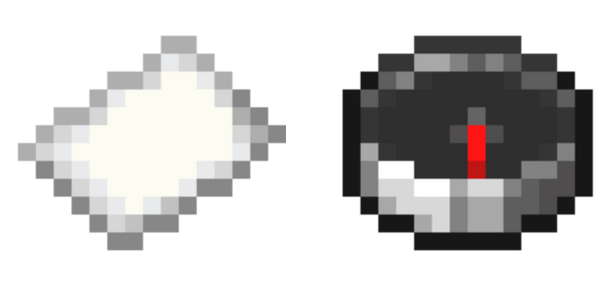
To make a map in Minecraft, you will need two primary materials:
Minecraft map recipe
Paper
Compass.
The type of map you craft will depend on whether you use the Compass or not, resulting in either a basic or a locator map.
Paper Collection (Sugar Cane Farming)
Paper is the primary material for any Minecraft map, and you will need a lot of it if you plan to expand maps. Paper is made from Sugar cane, which grows naturally near water.
You need 8 sheets of paper to make an Empty map (the basic version).
Paper is made from Sugar cane. You should set up a Sugar cane farm near water to ensure you have a constant supply of Paper for Resource management.
Sugar cane is harvested and then crafted into paper in your Crafting table (three Sugar cane in a row makes three paper).
Compass Crafting (Iron + Redstone)
The Compass is what makes your map track your player location and is essential for a Locator map. Without it, the map will show terrain but not your position.
Compass Crafting Recipe minecraft
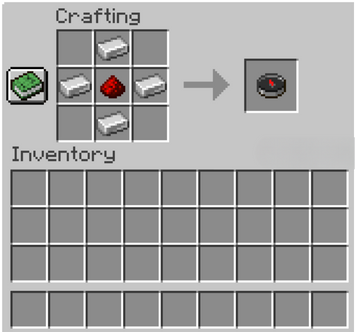
Compass crafting is done by combining Iron ingots and Redstone dust in a specific pattern.
You need 4 Iron ingots placed in a diamond shape around the outside and 1 Redstone dust in the center of the Crafting table.
The Compass will always point to the world’s original Spawn point by default.
Map Recipe in Minecraft
The basic Map recipe changes based on whether you want a basic Empty map or a Locator map. You must use a Crafting table for both recipes.
Recipe 1 (Empty Map): 8 Paper surrounding an empty center in the Crafting table. This is the foundation for all Minecraft maps.
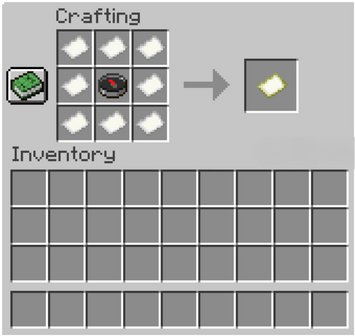
Recipe 2 (Locator Map): 8 Paper surrounding a Compass in the center of the Crafting table. This map tracks player movement instantly.
Crafting a Map Step by Step
To craft a map is simple once you have gathered your paper and, optionally, your Compass. The method is nearly identical for both major versions of the game.
How to Craft a Map in Java Edition
To craft a map in Java Edition, you use the following steps. The Crafting table is required for the 3x3 grid.
Map Crafting Recipe Minecraft
Step 1: Open your Crafting table.
Step 2: Place 8 papers in all the slots except the center slot.
Step 3: For a basic Empty map, leave the center empty. For a Locator map, place a Compass in the center.
Step 4: Collect the Empty map or Locator map from the output slot.
How to Craft a Map in Bedrock Edition
The method to craft a map in Bedrock Edition is slightly different for the basic Empty map, which requires only paper.
Step 1: In Bedrock Edition, you only need 9 Paper placed in all nine slots of the Crafting table to create an Empty map.
Step 2: To make a Locator map in Bedrock Edition, you use the same recipe as Java Edition: 8 Paper around a Compass in the Crafting table.
How to Make an Empty Map
The basic Empty map is the starting point for Exploration. It is not active and will not show terrain or your location until you activate the map by using it.
To activate the map, hold the Empty map in your hand and right-click (or use the interaction button on a controller).
This creates a Map level 0 Minecraft map that starts recording the area immediately around your current position.
Types of Maps in Minecraft
The types of maps go beyond the basic map you craft and include special pre-filled maps that lead to valuable locations.
Locator Map vs Empty Map
Understanding the Empty map vs locator map difference is crucial for effective Navigation.
Empty map: Shows the terrain you explore, but it does not show your player icon. It is often used for Map art or if you want to hide your position from other players on Multiplayer servers.
Locator map: Shows the terrain AND an arrow representing your player and your direction. This makes it essential for Navigation and Sharing maps with teammates.
Treasure Maps (Ocean Monuments, Buried Treasure)
Treasure maps are special types of maps that lead to specific structures or loot. These maps are found, not crafted.
Buried treasure map: Found in Shipwrecks or Ocean Ruins. It leads to a chest of valuable loot, marked by a Red X on the map, and requires you to dig.
Ocean monument map: Can be bought from a Cartographer villager for Emeralds and a Compass. It leads to a dangerous Ocean monument map where you can fight the Elder Guardian.
Trial Explorer Maps (Latest Update)
The Trial Explorer map is a newer type of map introduced in the Latest Minecraft update (1.21).
Trial Explorer Map: This map can be bought from a Cartographer villager and leads to the challenging Trial Chambers structures. It makes finding the Trial Chambers much simpler for Exploration.
How to Use Maps in Minecraft
Using maps in Minecraft is simple and fun. A successful map will accurately show the terrain you have traversed.
Activating and Reading a Map
To activate the map, hold the Empty map in your hand and use it. This will immediately transform the Empty map into a Map level 0 Minecraft map.
The map will immediately start filling with the area around you.
To read a map, hold it up. The arrow shows your location and direction relative to the terrain already explored.
How Maps Work (Coverage, Scaling)
Minecraft maps work by defining an area called Map coverage. This coverage is based on a rigid grid system that determines the map’s boundaries, regardless of where you activate the map.
Map coverage is centered on a specific section of the world grid.
Map scaling determines how much of the world the map shows. A newly crafted Map is Map level 0 (small, 128x128 blocks), and it can be expanded up to Map level 4 (huge, 2048x2048 blocks).
How to Read Treasure Maps
Read treasure maps by looking for the special symbols. The small white dot shows your location on the map relative to the coastlines and landmarks.
The Red X on the map marks the exact location of the buried chest or structure.
You must explore to find the Red X on the map, then dig down at that spot. The closer you get, the more the white dot will align with the Red X on the map.
Expanding and Upgrading Maps
A small Map level 0 will not cover much ground, so you will want to expand maps for better Exploration. You can make the map bigger up to five total Map level sizes.
How to Make a Map Bigger
To make the map bigger, you use the Cartography table with paper. This increases the Map coverage area shown.
The Cartography table is crafted with 2 sheets of paper placed above 4 wooden planks. It is the most efficient tool for map manipulation.
You can also expand maps using the Crafting table by placing the map in the center and surrounding it with 8 pieces of paper.
How to Level Up Maps with the Cartography Table
The Cartography table is the best way to make a map bigger. This process will increase the Map level and the physical area the map represents.
Step 1: Place your existing map in the top slot of the Cartography table.
Step 2: Place a piece of paper in the bottom slot.
Step 3: This will make the map bigger to the next Map level. You can repeat this up to Map level 4 (the maximum size).
How to Combine Maps for Large Walls
To combine maps for a massive display, you must create Maps at the same Map level for adjacent areas of the world.
You create separate Maps that cover the next section of the world grid.
You place these filled Maps on Item Frames side-by-side to create a seamless, large image on your Map wall. This is a great decoration tool for Exploration builds.
Advanced Map Uses
Maps are not just for Navigation; they can be used for art and sharing with Multiplayer friends. These Advanced map uses require careful crafting and placement.
How to Make a Map Wall
A Map wall is a popular decoration and Exploration builds project that shows a massive portion of your world.
The map wall is made by combining maps of adjacent regions on item frames that are placed on a large wall.
You need to ensure all Maps are at the same Map level and explore the area for each map to fill it in thoroughly before placing it on the wall.
How to Do Map Art in Minecraft
Map art is one of the Advanced map uses that allows players to create huge, detailed pixel designs. This is a time-consuming but rewarding process.
Players build the art design on the ground using specially arranged colored blocks.
Then, they create a Map of that area, which captures the design.
Map art pieces are often copied and sold on Multiplayer servers for profit.
Copying and Duplicating Maps
To share Maps with Multiplayer friends, you can copy maps or Duplicate maps using the Cartography table.
Copy maps: Place the filled map and a blank Empty map in the Cartography table to Duplicate maps. The new map will be linked to the original and updated when the original is updated.
You can also copy maps by placing the filled map and 7 Paper around a new Empty map in the Crafting table.
Tips for Efficient Map Usage
Efficient map usage will save you time and resources. Always consider Map coverage before starting to fill a new Map.
Best Way to Explore with Maps: To fill a Map quickly, travel along the edges of the Map coverage diagonally. This makes sure you fill in the most space per block traveled.
Using Maps in Multiplayer (Sharing, Locating Players): Multiplayer maps are crucial for teamwork. Sharing maps is easy once you copy them. Locator map arrows allow you to locate players who are carrying the same map.
Resource Management for Map Crafting: Resource management is key for Maps. You will need hundreds of sheets of paper for a Map wall project. Set up a large Sugar cane farm to easily make the map bigger and for copying maps, saving you many hours of gathering Sugar cane.
Conclusion
The Map in Minecraft is a simple item that is a powerful tool for freedom and creativity. It is the only way to master Navigation and record your Exploration honestly.
Why Maps Are Essential for Exploration and Building
Maps are essential for Exploration because they give you the confidence to leave home knowing you can always find your way back. They prevent the frustration of getting lost in a massive Minecraft map. For Exploration builds, the ability to create a Map wall allows you to document your entire world uniquely and decoratively, turning your Exploration into Map art. Master the Map recipe and the Cartography table today, and start exploring with maps to the fullest.
Popular
$0.85/GB Minecraft Hosting
FREE game server, VPS, web host, dedicated IP & more on most plans!