
This tutorial will show you how to run the AutoSSL on cPanel as ElixirNode offers free and unlimited SSL certificates for all website hosting! STEP 1 Login to website hosting cPanel and either click on the wrench icon “🔧” OR search for “SSL/TLS Status” and click on it. STEP 2
This tutorial will show you how to run the AutoSSL on cPanel as ElixirNode offers free and unlimited SSL certificates for all website hosting!
STEP 1
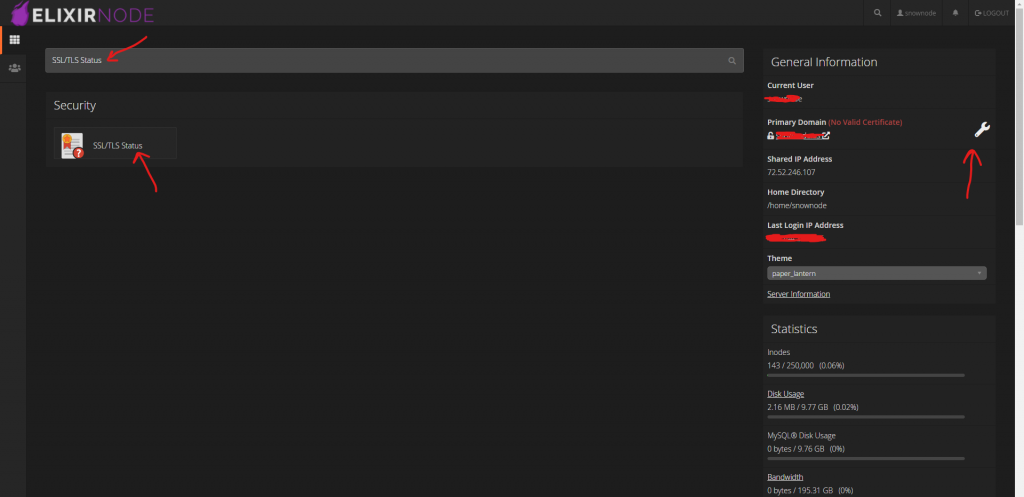
Login to website hosting cPanel and either click on the wrench icon “🔧” OR search for “SSL/TLS Status” and click on it.
STEP 2
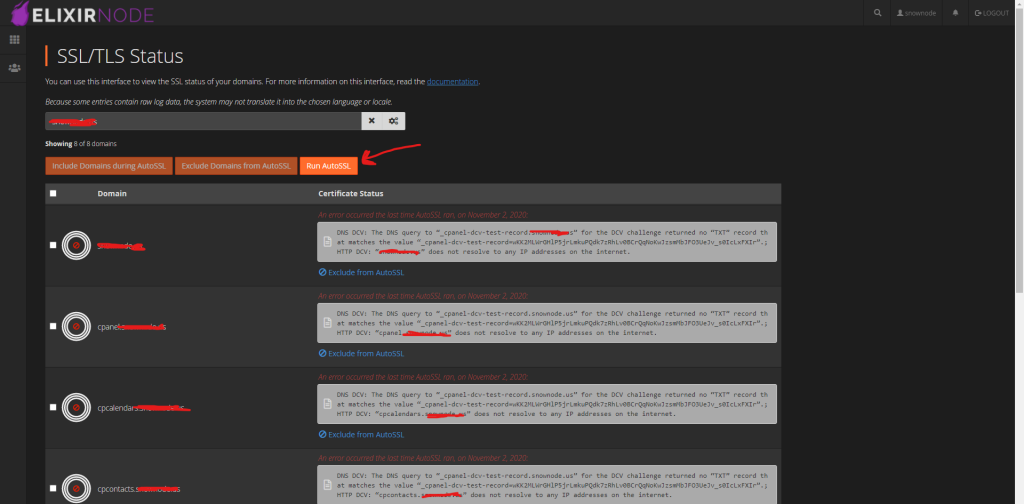
Once you’re on this page, click on the “Run AutoSSL” button. Once you click on it, it will progress and after a minute or so it should be good and your website hosting domain should have an SSL certificate now!
If you encounter any issues or have any questions then contact us!
FREE game server, VPS, web host, dedicated IP & more on most plans!
Get Started